









QwikCapture for Mac
- Free
- 4.3
- 3
- V1.0.21
Free Download for Mac
View an ad to download for free

- Jayu Software Studio
- More programs (4)
Free Mac screenshots, annotations, local OCR, Library and screen recording
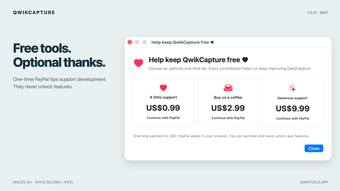
QwikCapture is a native screenshot, annotation, desktop pin and screen recording app for macOS 15 or later. Version 1.0.21 fixes visible seams at the capture boundary: the selected area and its surroundings now use the same frozen screen frame while you edit. All local tools are free, with no account, AI subscription or API key required. Optional one-time PayPal tips support development and do not unlock features.
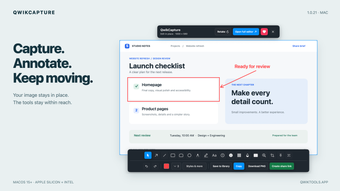
Capture a region, a window or a display, use a delay, repeat the last region or save precise capture presets. Drag and release to confirm a region. The updated editor keeps the image at the original selection position and size, with a top action bar for retaking, opening the full editor, optional support and closing, plus a two-row bottom toolbar for annotation, undo, redo, saving and sharing. Menu items show the configured keyboard shortcuts.
Explain your capture with text, arrows, shapes, freehand drawing, highlights, numbered markers, magnification and solid redaction. Adjust annotation styles and layer order, undo edits, crop an image or save an editable project. Use a flattened PNG or JPEG for sharing; editable projects and local history retain the original image.
Keep references visible as floating desktop pins. Resize, rotate, mirror, change opacity, lock or enable click-through, then recover hidden pins when needed. Save pin workspaces, arrange references and restore a session after relaunching.
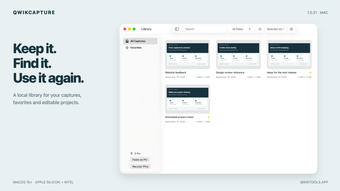
Enable the optional local library to organize captures with favorites and tags, search titles or recognized text, and reopen saved captures for editing. Choose a retention period and storage budget. History stays on your Mac and is not uploaded automatically.
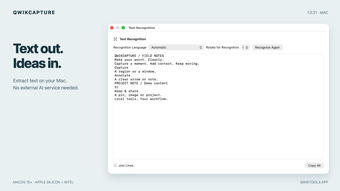
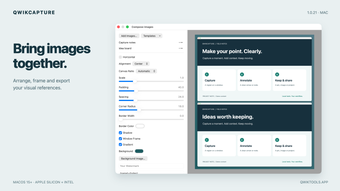
Extract text locally with Apple Vision, choose the recognition language and orientation, copy the result or process images in batches. No external AI service or API key is needed for OCR. Compose multiple images horizontally or vertically, adjust spacing, rounded corners, backgrounds and shadows, add a window frame or watermark, and export PNG, JPEG or PDF. Scrolling capture uses manual scrolling and step-by-step frame collection with overlap alignment.
Record a display, region or window, with optional system audio and microphone input. Adjust frame rate and output size, trim the result, export video or GIF, and queue exports. Screen Recording permission is required to capture other apps; microphone permission is needed only when microphone recording is enabled.
Capture, annotation, recognition, history and local exports run on the device. Online sharing uploads only the item you explicitly choose and confirm. PayPal checkout opens in your browser and confirms the payment there.
The universal download supports Apple Silicon and Intel Macs running macOS 15 or later. The app is Developer ID signed and Apple notarized. Interface languages include English, Simplified Chinese, Traditional Chinese, Japanese and Korean.
Loading…
App specs
Developer
- Jayu Software Studio
- More programs (4)
License
Free
Version
1.0.21
Latest update
Platform
Mac
OS
Mac OS X
Language
English
Available languages
- English
- Chinese
- Korean
- Japanese
Downloads
3
Size
4.81 MB
Program available in other languages
QwikCapture for Mac
- Free
- 4.3
- 3
- V1.0.21
Free Download for Mac
View an ad to download for free
User reviews about QwikCapture
Have you tried QwikCapture? Be the first to leave your opinion!
Add reviewTop downloads Screen Capture for Mac
Top downloads Screen Capture for Mac
Top downloads Screen Capture for Mac
Related topics about QwikCapture
Latest articles

Paramount-Warner Bros. Discovery deal still on hold: $7 million a day at stake

Grand Coulee Dam replacement math is updated: at least 23 million solar panels

Ghost Soldier sets November 2026 release: Jim Caviezel leads Sony thriller

The Mandalorian and Grogu rumor goes viral: Disney+ hasn’t fixed Star Wars’ ‘lowest-grossing movie’

Call of Duty: Warzone ends PS4 and Xbox One support: it happens with Modern Warfare 4 Season 1
Laws concerning the use of this software vary from country to country. We do not encourage or condone the use of this program if it is in violation of these laws. Softonic may receive a referral fee if you click or buy any of the products featured here.